What is Drafter?
Drafter™ is a free app for writing screenplays and stage plays. You write on the left, and the script’s pages build on the right as you type. It runs in your browser at drafter.dev, or as a desktop app, and it never asks you to sign in.
In one minute
A screenplay is the written form of a film or a TV episode: a heading for each scene that says where and when it happens, what we see, and what each character says. A stage play is the same for the theatre. Both are set out in a strict format that everyone who reads scripts expects. A screenplay page runs about a minute on screen, and Drafter’s running time counts it that way, at a rate you can change.
Drafter does that formatting for you. You type plain text in a simple style called Fountain: a line such as INT. KITCHEN - NIGHT becomes a scene heading, and a name in capitals becomes a character about to speak. Drafter turns it into proper pages as you go, and into a PDF to send. Drafter is Fountain-first, and if you’d rather not type marks, Classic Mode is beside it: Enter and Tab move through the script, the way many screenwriters expect, and the file stays Fountain.
Who it’s for:
- Screenwriters and playwrights, from a first script to one that’s going into production.
- Anyone learning the format. The element bar writes the marks for you, and a guided first screenplay and stage play teach each one as you read.
- Novelists, and anyone with notes or a treatment. Drafter writes Markdown documents too, and turns them into a clean PDF.
It’s free, with no catch. It works offline, and your script is a plain text file that you own.
For writers: why Drafter over Final Draft?
Every app in the comparison on Why Drafter is good at what it does. These are the reasons a writer might pick Drafter. What Final Draft costs and asks for is from its maker’s own pages, read on 31 October 2026.
- Free, with no catch. Final Draft 13 is $249.99 once, or $99.99 a year, after a 5-day trial. Drafter has no price, no trial, no paid version, and no ads.
- No login, licence key, or activation. Final Draft 13 signs in through its store, on two computers. Drafter has no account to make and nothing to activate, on the web or on the desktop.
- Instant. drafter.dev opens straight into a script. Nothing to install first, and no setup.
- Offline and private. Once it has loaded, Drafter runs with no connection. No cookies, no tracking of you: your script never leaves your device.
- Your files are plain text you own. A
.fountainfile opens in any text editor, and will still open in fifty years. A lapsed licence can never lock you out of your own work. - Final Draft files go in and out. Open the
.fdxa producer sends, and hand one back. - On every computer. In any browser, on a computer or a phone; desktop apps for Windows and Linux; and a Mac app you build with one command. Final Draft 13 runs on a Mac and Windows, not Linux.
- The features that matter. Industry-standard pages, stage plays, an outline and index cards, notes, version history and Compare, numbered drafts, character and scene stats, a story map to send to anyone, offline spellcheck, focus mode, goals and sprints, and a dark theme.
What Final Draft has that Drafter doesn’t, yet
Each of these is planned, and each will be free.
- Production features: revision colors and marks, locked pages and scene numbers, OMITTED scenes, and a breakdown report. Coming in v0.27.0, with sides.
- PDF import: planned, in Phase 3.
- TV templates: Phase 3.
- Read aloud, for a table read: Phase 4.
- Real-time co-writing: later.
- A Mac download and an iPhone app. Final Draft has both. Drafter builds on a Mac with one command, and a signed Mac download comes later; on an iPhone, Drafter works in the browser.
How Drafter compares has the full table, with WriterDuet, Fade In, Highland Pro, Arc Studio, and Celtx too.
For producers, directors, and script coordinators
- Industry-standard pages. Screenplay and stage-play format, laid out as you type, with page counts you can trust, and a PDF that looks like what readers, agents, and productions expect.
- Final Draft round trips. An
.fdxfile opens as a new script. Anything Drafter can’t map comes in as a note, listed in Problems, so nothing is lost silently. Export as Final Draft writes the scene headings and numbers, action, dialogue and dual dialogue, notes, and the title page. - Nothing to install to read it. Send a PDF, a web page that opens in any browser with no connection, or an EPUB for an e-reader.
- Export options for each script. Scene numbers (none, as written, or every scene), the title page, and whether notes go along.
- Numbered drafts, and every cut kept. Start new draft keeps Draft 01, 02, and so on, and Cuts keeps everything you cut, for good. Both are saved beside the script as plain files, on the desktop and in Chrome or Edge. Drafts and cuts
- A story map to send to anyone. One page that shows someone who doesn’t read scripts the whole story so far: its shape, its people, and every scene in order, with a few lines of dialogue and what is still to write. It opens on a phone, has no code, fetches nothing, and never includes your notes. Story map
Coming soon
- Production, free (v0.27.0): colored revision sets with marks in the margin, locked pages (12A) and scene numbers (5A), OMITTED scenes, revised pages to send out, a breakdown report, and sides for actors.
There is no paid version, and there won’t be one. The production features are free too.
Can I trust this?
- No account. Nothing to sign up for, and nothing to sign in to.
- No server keeping your scripts. drafter.dev is a static site: it has no server that could receive your script. Your work stays on your device, in the files you save and in Drafter’s autosave in your browser.
- No cookies, no tracking of you, no telemetry. The website, drafter.dev, measures visitor traffic with Plausible, privacy-focused analytics with no cookies; the downloaded desktop app has no analytics at all. See Privacy.
- Drafter never calls an AI. If you use one, Drafter for Claude lets it read the folders you choose, and nothing else.
- Works offline, once it has loaded.
- Open source. The code is MIT-licensed and on GitHub, for anyone to read. It is written from scratch, with no code from any other screenwriting app, and audits check that it stays so: Audits lists every one, newest first.
- No forced updates. The web app updates when you reload, or the next time you open it after closing every Drafter tab. The desktop app asks GitHub once at start-up whether there’s a new version, never installs or restarts by itself, and can be told not to check at all.
Who makes it. One writer, for writers. Drafter isn’t a business.
Made by Christopher Schweda (cschweda) metaincognita.com
Drafter™ and the Drafter logo are trademarks of Christopher Schweda. The MIT licence covers the code; it doesn’t grant use of the name or logo.
Security
- Nothing in a file ever runs. A script is read as text, and your words are shown as words, never as web code.
- A strict content security policy. The web app tells your browser to run only Drafter’s own scripts, so nothing slipped into a page or a file can run there.
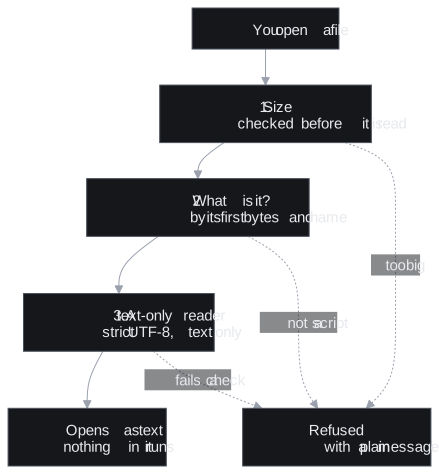
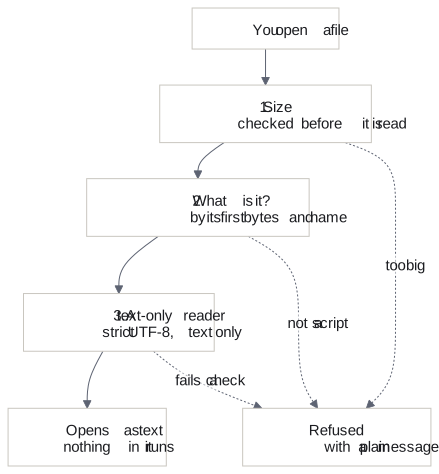
- Size limits are checked before anything is unpacked, and a Final Draft file never makes Drafter fetch or read anything else.
- The trap documents. Drafter is tested against 294 deliberately broken and hostile files, in every format it opens. Each must open with its text, or be refused with a plain message, and nothing may crash, run, or fetch anything. More below.
- Found a security problem? Please report it privately: choose Report a vulnerability on the repository’s Security tab (SECURITY.md says what to include), or email cschweda@gmail.com with the details. Never in a public issue.
The README’s Security section and Technical details have the specifics.
For technical people
The numbers
As of Drafter 0.27.0 (10 November 2026), Drafter has these tests:
- 4,635 unit tests of the engine, across 24 packages.
- 2,805 unit tests of the web app.
- 446 unit tests of the desktop app.
- 58 tests of the script modules.
- 1,463 browser tests of the whole app, each run in 5 projects (Chromium, Firefox, and WebKit, Safari’s engine, at desktop size, and an Android phone and an iPhone): 7,315 runs.
- 140 end-to-end tests of the desktop app, in Electron.
- 294 trap documents, with 1,376 checks: each trap, at each way in it goes through.
- 794 tests of the trap suite’s own, which run the trap documents through the engine, the command line, and the modules folder.
scripts/test-counts.mjs counts them at each release. It runs the unit tests once, and lists the browser and desktop tests without running them, with Playwright’s --list. A listed test may skip itself where it doesn’t apply, such as a phone-only test on a desktop browser.
The stack
- TypeScript, in a pnpm monorepo.
- The web app: Nuxt 4, Vue 3.5, and Nuxt UI 4, built as a static site on Netlify, and an offline app (a PWA).
- The editor: CodeMirror 6.
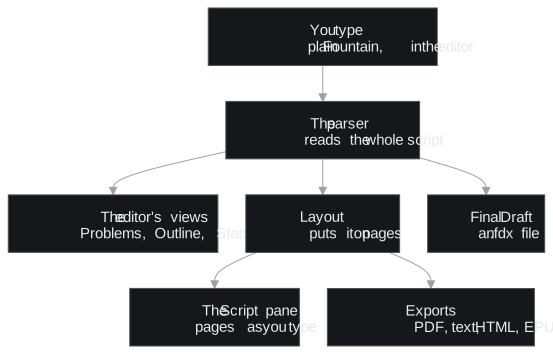
- The engine: framework-free
@drafter/*packages (the parser, the layout, and the renderers), shared by the web app, the desktop app, and the command line. - PDFs with pdf-lib; storage in IndexedDB, with Dexie; spellcheck with nspell and Hunspell dictionaries.
- The desktop app: Electron.
- Tests: Vitest and fast-check, Playwright, and axe. Formatting and lint: Biome.
How it works
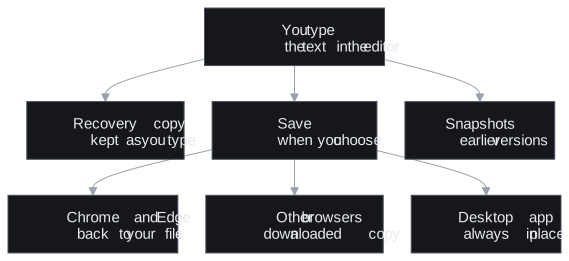
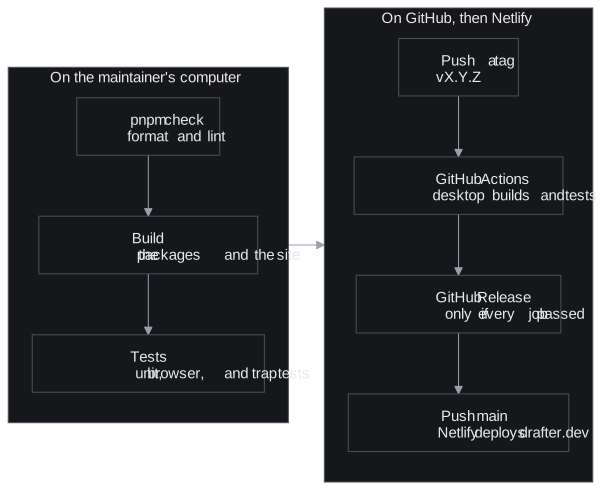
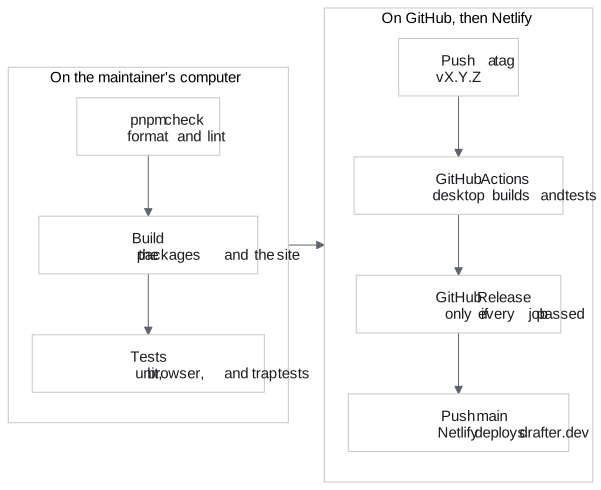
Four diagrams, drawn from the Mermaid in How it works on GitHub. Technical details has more.
The trap documents
The trap documents are 294 files made to break things: empty, huge, malformed, mislabelled, or hostile. By format: Fountain 65, Markdown 41, plain text 20, Final Draft 30, Highland 42, Fade In 11, HTML 31, EPUB 18, pipes, links, and folders 13, module manifests 9, cuts 8, draft 6. Each has the one outcome it must have, opened with its text or refused with a plain message, at every way in that applies: the web app’s Open, the desktop app’s, the command line, and each format’s reader. The tests check that nothing crashes, runs, or fetches anything, and that each finishes in time. The trap documents’ README has the whole list and how they run.
Links
- The source code on GitHub
- Developing Drafter: building it, the packages, and releasing.
- Audits: every security, clean-room, and accessibility audit, newest first.
- The roadmap
- The changelog, every change in detail.
- What’s new, the changes in plain words, newest first.